If you are the kind of person who enjoys increasing productivity by optimizing your daily workflow — and you’re not afraid of learning one or two new keyboard shortcuts — then Things 1.2 is for you! Here is a quick overview of the new features:
We’ve added a powerful new way of adding tasks to Things from other applications - Quick Entry Autofill - along with many new shortcuts for editing and managing all of your tasks inside Things.
Things now also integrates with Spotlight and is fully localized into 6 languages: English, German, Japanese, French, Spanish, and Russian. Plus, with the upcoming release of Snow Leopard, we have also made sure that Things runs smoothly on the new OS.
Finally, we have added plug-ins for the most popular application launchers such as LaunchBar, Quicksilver, and Google Quick Search Box. Please refer to this wiki page for more details on how you can download and install them.
As always, you can read the full release notes in our wiki.
Quick Entry Autofill
Imagine the following scenario: You receive an email from a friend asking you to buy some items for his party. Previously, if you wanted to add that information to Things, you would invoke the Quick Entry dialog by pressing the system-wide keyboard shortcut. You would enter a task title and then copy over the items you need to buy for the party into the notes section. You might also want a link to the original email so you can reply to your friend once you’ve completed your errands. In this case you would have to drag and drop the email into the notes section as well. As you can see, this process is quite involved and cumbersome.
Wouldn’t it be great if Things just recognized the application you’re in and tried to extract the most useful information for you? This is exactly what Quick Entry Autofill does! Originally, Bartek invented this feature for iGTD and called it the “F-Key trick”. With his help, we have now implemented an even better version of it for Things.
If you go to the Things application preferences, you can see that there is now a second system-wide keyboard shortcut you can specify:
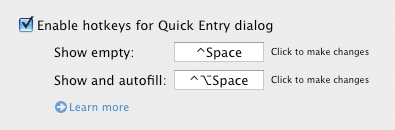
Of course, you can fully customize this shortcut.
Now, let’s return to our example. If you select the text that contains your friend’s errands inside his email and invoke the Quick Entry Autofill keyboard shortcut, Things will automatically extract the selected text and pre-populate the Quick Entry window with both the text and a link to the original email!
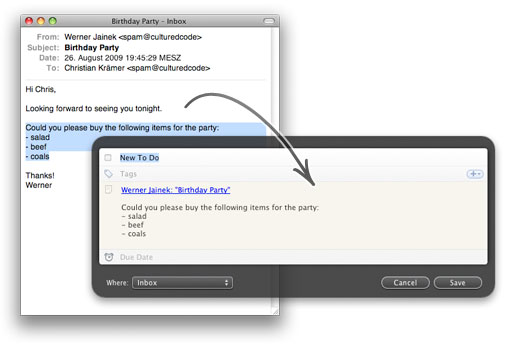
The Quick Entry Autofill feature behaves similarly in many other applications: it copies the currently selected text into the notes of the to-do and adds a link that is useful in the current context. Here are some examples: In Safari, it will automatically add the URL of the current page. In Finder, it will create links to currently selected files. And in Pages, it will create a link to the currently edited document.
Please note: After you launch Things 1.2 for the first time, you have to quit and restart all running applications for Autofill to work properly (you can also log out and then log back in to your account again to achieve the same effect). The reason is that Things uses Mac OS X Services to get the currently selected text and Mac OS X only updates Services for a given application at launch time. Also, note that for applications which do not support AppleScript (for example, Firefox), Autofill will not be able to detect the current URL or opened document.
UPDATE: Firefox actually does support AppleScript. Jesse Ruderman from Mozilla kindly helped us add autofill support for Firefox 3.x to Things 1.2.1, which is now available.
Keyboard Shortcuts
Let’s look at three examples. For a full list of shortcuts check out our keyboard shortcut overview (PDF).
- If you select a task and then press Command-Up or Command-Down, it will move the task up or down in the current list. If you also hold down the Option key, it will move the selected task to the first or last position.
- Filtering by tags is now also accessible from the keyboard. Let’s say you have a tag “home”, and you have specified “h” as the shortcut for this tag. In this case, pressing Control-h in a given list will filter it by that tag. Pressing Control-h a second time will remove the filter and show all tasks again.
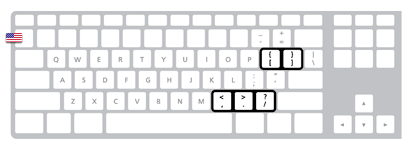
- If you want to modify either the due date or the start date (Scheduled list), you can now do that via the keyboard, too. In the Scheduled list, postponing a scheduled item for one more day can be achieved by pressing Control-] on a US keyboard, whereas Control-[ subtracts one day from the scheduled date. If you also hold down the Shift modifier key, 1 week will be added or subtracted. The shortcuts for due dates behave similarly.
If you look at the position of those shortcuts on a US keyboard, you will see that we have chosen them to be in close proximity to one another:
If you have a non-US keyboard layout, then the [ and ] keys might be replaced by other keys, like umlauts for example in the case of a German keyboard:
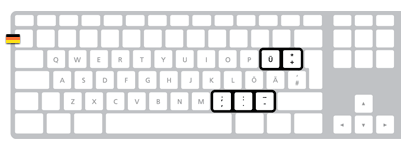
The general idea is to keep the position of the keys the same no matter how those keys are labeled. This ensures that the keyboard shortcuts are easily accessible, regardless of the actual language/keyboard layout.
Spotlight
The first time you launch Things 1.2, it will prepare your existing database for Spotlight search. After this is completed, you will be able to find all your to-dos and projects via Spotlight. If you’re looking at the Spotlight search results in the Finder, you can even press the spacebar (which invokes QuickLook) and get a preview of the to-do. If you double-click the to-do, Things will become the active application and show the actual to-do.