The new release contains 21 improvements and bug fixes. More detailed information about the new features can be found in the articles below:
December 11th, 2007
December 11th, 2007
The new release contains 21 improvements and bug fixes. More detailed information about the new features can be found in the articles below:
December 11th, 2007
Things now contains a feedback dialog, making it easier for you to get in touch with us. To open the feedback dialog, choose the menu command Things > Provide Things Feedback.
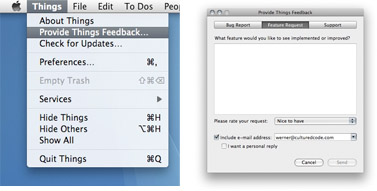
Using this dialog is a great way to send us your feedback. It helps us to more efficiently categorize your bug reports, feature requests, and support questions. If you want to include images or other attachments, just write a regular email to things@cu... (or click “Feedback” at the very bottom of this page).
However, to keep track of your thoughts or to share your suggestions with other users for discussion, the wiki and our upcoming forum are great places as well.
December 11th, 2007
I'm sure many of you discovered that the Quick Entry Dialog can be invoked by pressing a keyboard shortcut. In the new version, this does no longer bring up the main application window. If you are on Leopard, the Dialog plays nicely with Spaces as well.
Also, the service menu entries for Things are now working again. You can select any text in your current application and go to Services > Things > New To-do Containing Selection as Note/Title. This brings up the Quick Entry Dialog with a pre-populated note or title field. It doesn't stop there, however, since you can assign keyboard shortcuts for these entries as well. Just go to "Keyboard and Mouse" in the System Preferences and switch to the "Keyboard Shortcuts" tab. Click the + Button and add "New To-do Containing Selection as Note" into the "Menu Title" field:
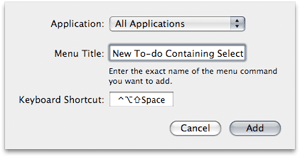
I use ctrl-alt-shift-space for this, but we are interested in what you are using. Feel free to put your shortcuts into a comment to this post.
But wait, there is more! Many of you wanted to be able to include references to files and mails in to-dos. Starting today, you can do this in one of the following ways:
December 11th, 2007
One of the biggest surprises was the amount of feedback we received on date related features. The single most requested feature: recurring tasks. Also users were often surprised that tasks due today didn't automatically show up in the Today list. Then there was this irritating bug that prevented system wide date preferences to be honored correctly. Users also requested more convenient input methods like natural language input and a mini calendar.
We have every intention for Things to get a best in class date implementation. Today we are adding natural language input and a mini calendar for due dates.
The next updates will also bring the following improvements:
Of course, these features will be implemented in a way that does not complicate the existing workflow.