Things 1.2.2 Released

September 14th, 2009
4:56 pm

Main

After our recent Things 1.2 release, we got quite a bit of feedback on the new features. With today’s release of Things 1.2.2, we attempt to address the most frequent requests and bug reports.

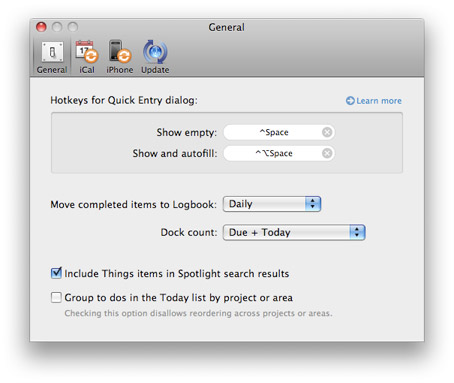
For example, you can now disable Spotlight indexing. We also made it possible to enable or disable either of the two Quick Entry keyboard shortcuts independently. With these new options, we needed to reorganize the General pane to keep Things’ preferences simple and uncluttered:

To enhance consistency with the new autofill feature, we added the ability to drag multiple emails and also cards from Address Book into the notes section of a to-do. Autofill now also works with Microsoft Word 2008. Unfortunately we couldn’t add support for Entourage or Evernote due to their lack of the necessary AppleScript support.

There are many other fixes and small improvements like better compatibility with Japanese input methods, better French localization, a keyboard shortcut reference directly accessible from the Help menu, and fixes to the plug-in syntax. Please refer to the release notes for a full list.

Posted by Jürgen

Pinging is currently not allowed.

19 Comments

  1. When are you going to be able to sync wirelessly without have to do so on your home/office network. I have three computers and it sucks that I can’t sync them via mobileme or some other form on the fly.

  2. Now Quick Entry works great with Japanese.
    Thanks!

  3. Would be fantastic if the autofill feature works with Mozilla Thunderbird.

    - What is needed from the M. T. team side to implement this feature?

    Maybe I can work on this, or ask the mozilla team.

    Again, thank you for this best tool!

  4. Hey, I don’t mean to be a critic but is it possible to change how the Quick Entry pop up looks? It’s very useful, just a bit overdone with the (extremely) round corners and the mismatching colours.

  5. Great to see the progress, this is really going to be the absolute top program out there for task management. Still, the thing holding myself and many other back is the over the cloud syncing. Rather see this the main focus rather than some of the other updates we’ve been seeing. But, it sounds like you are hard at work to perfect this, so I’ll trust you! Can’t wait!

  6. Great work CC ! :) Keep it rocking :) !

  7. Great work, Things is without a doubt my favourite GTD app! I am still missing a web interface though, this would make it possible to use Things on my work computer, etc.

  8. Really disappointed about the lack of support for Evernote. Things and Evernote are my two main applications for GTD.

    I’ll submit a feature request to Evernote.

  9. Cultured Code is definitely back on the job! I’m elated to see regular updates again! Keep up the great work!

    Danke, Jürgen!

  10. When will we see over the air sync with iphone ? This is the most important feature !

  11. Just a plain thank you! You’re work and focus is appreciated.

  12. I’m now a committed things user arriving via the iPhone and then buying a Mac to run Things :-)

    Big wishes though of course. Cloud sync, totally transparent just like mobile me. Secondly option to hide completed tasks in projects on the Mac like happens automatically on the iPhone. At present the behaviour is different on the two. Finally nested project/sub projects would be nice.

  13. Ditto on the “great customer service”. It’s great to support a product whose staff listens to customers and responds.

  14. Would be fantastic to see either a PC version or an online version (maybe via subscription?). I love Things on my iPhone, but have a hell of a hard time at work as they are Windows-based. Definitely limits the way I use the product, and I would pay twice the amount for a Windows version, just to be able to sync my tasks.

  15. Really glad to see CC back on top of things.

    Way to go guys.

  16. Thanks – this is all nice but when is the real stuff coming? The shortcuts are kind of useful but hardly groundbreaking – ota sync, integration with iCal, push services for the iphone app etc are what we really need now.

  17. Whats new in 1.2.3 ?

  18. Just a quick thank you – it really seems that you guys are serious this time about stepping up communication and development speed. Three updates this month? Fantastic!

  19. @Emanuel: You can find more details for our releases here Release Notes.