Things 0.9.5

October 12th, 2008
9:55 pm

Cultured Communication Main Things 0.9.6

You might have noticed that in one specific regard the iPhone version of Things was one step ahead of the desktop version: sorting by due dates. This changed today.

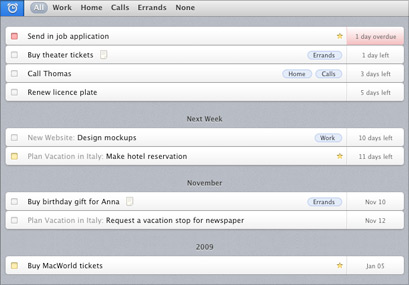
Aside from bug fixes and refinements, Things 0.9.5 allows you to filter and sort any list by due date. Similar to how the tag bar works, the due date filter button is only shown when needed; that is, when the given list contains items that actually have a due date.

duedatefilterbutton.jpg

When filtering your Next list for example, to-dos without a due date are hidden. The remaining ones are sorted by date and grouped into sections like Next Week, November, or 2009, making it easy for you to keep track of them.
duedatefilterscreenshot.jpg

Posted by Chris

Pinging is currently not allowed.

38 Comments

  1. This is a very nice feature. Go CC!

  2. Yes! Thanks a lot!

    God! TT and TD updated in less than 2 day!

  3. It’s great to see that Things is back on track. Love the way everything you add gets out of the way when you don’t need it.

  4. Great version… I’m waiting the 1.0 release

    Congratulations CC

    Francois

  5. Love this feature - but why hide items that don’t have a due date?

    For me, this is mostly a problem in the Today list, where items I’ve flagged as “Today” disappear if they don’t have a due date.

    It seems they could be listed at the bottom.

  6. This feature is great, but I must echo randot’s thoughts on not hiding items without a due date. Listing them at the bottom (with maybe even a toggle list) would be much better.

    Small UI gripe: When the clock is clicked, the highlight should reflect the users appearance setting (aqua/graphite)

  7. Nice feature, but still no sync between two Macs (home/office for ex.) w/ me.com.

    I really do hope this is a scheduled feature for the upcoming 1.0 release. IMHO its a key feature.

  8. [...] Things Blog added an interesting post today on Things 0.9.5Here’s a small readingYou might have noticed that in one specific regard the iPhone version of Things was one step ahead of the desktop version: sorting by due dates. This changed today…. [...]

  9. Is the iPhone app going to be location aware like OmniFocus’ iPhone app?

    I find Things much easier to use on the desktop, but consider location awareness to be as important as syncing between the two clients.

  10. Here’s what they said via twitter not too long ago:

    “OF’s location awareness is actually not as useful as it appears to be. Didn’t yet have the inspiration to do it right.”

  11. I also consider synchronising between two locations of vital importance. I’m in the minority by not having an iPhone to sync with, but I do have two computers (work and home), which have shared TODO lists (for example: “ring the bank”).

    It’d be nice if I could do this without some kind of AppleScript voodoo to SVN or similar, as that’s a kludge.

  12. Also, I’d definitely pay for Things if it had that feature.

  13. I agree with randot. I love the “sort by due date”-function, but it would be even better if tasks/projects without duedate wasnt hidden.

    Also, I still miss the ability to schedule tasks within projects. This limitation is very annoying. Remedy for this and me-sync is on top on my wishlist for TD.

  14. Great feature!

    However, I think it’d be even better if the items for this week were broken down by day of the week (perhaps as a preferences option).

  15. I disagree with Randot, I think it’s more sensible to hide the non-due tasks, just like the filter for keywords does. It clears away things that would otherwise be distracting.

  16. Love this feature - thanks!

    Just curious, has anyone else been having trouble with iCal syncing? The latest update of Leopard seem to break this for me - I lost bi-directional sync. The mismatches got so out of hand, I had to turn this feature off. Worked perfectly for months before I upgraded Leopard to 10.5.5.

  17. I also think that the non-due tasks should be shown at the bottom with toggle option like Mike Vitoroulis said.

  18. Why not just make it a preference item with a “radio” switch:

    __ Show undated items in Next

  19. I appreciate this feature, but I nearly always work on multiple projects, and I find seeing them separately helpful. In my Today view they’re displayed in the order I select. When I sort by due date, I’d like my projects to remain separate, but items within them to be sorted by due date, instead of having all due items from different projects jumbled into one big list.

  20. Hello, developers!
    I’ve made russian localization for Things, but I have some issues that need your advices…
    Also, you don’t answered my e-mail.

  21. I agree with Cheryl that when using the due date filter, seeing items separated by project is ver important. For example, I may have “call bob” as an item in multiple projects, and when I view them using the due date filter, I see the context for them to make sense.

  22. A very nice additional feature.

    I too agree with Cheryl that when using the due date filter, seeing items separated by project would be very useful indeed.

    Well done CC always a useful improvement and worth waiting for.

  23. I echo Cheryl’s sentiments — although I DID squeal with delight when I first saw the update.

    Watching Things grow has been a wonderful experience so far. Thanks, CC!

  24. I just want to add to the other commenters requesting that the sort by due-date functionality not hide items without a due-date. They should just show up at the bottom of the list.

  25. Love the update and love the implementation. When clicking the due date filter button, I expect to filter all tasks without due dates.

    However, I respect the opinions expressed above. Perhaps there could exist an option in preferences for those that would like to view tasks without due dates when the due date filter button is activated.

    But I like it just as it is. Well done!

  26. [I love the sort 'by due date'-function, but it would be even better if tasks/projects without duedate wasnt hidden.]

    100% agree. Great feature, even more when you integrate showing all tasks, not only the ones with due date.

  27. Today again I got bitten by your silly expiry date. Could you kindly stop that, its not the first time people hit trouble with that. I don’t know any other software people pay for and then sit on a time bomb that will explode when deep down in the code a developer thought it might be a good date to seal down the app. And if you keep this concept, warn the buyers next to the price of the app. I personally would not have bought the app if I had known that before hand.

  28. @got bitten
    Do you talk about Things Desktop?

  29. @got bitten — If you’re referring to Things for desktop, it’s not for sale yet. If you’re referring to Things Touch (for iPhone and iPod Touch), to the best of my knowledge it doesn’t/shouldn’t have an expiration date.

    There WAS an issue with a previous BETA version of Things for desktop having an expiration date that did “bite” a number of users, UNINTENTIONALLY on the part of the developers. But since the application is STILL not yet a commercial product, your suggestion that people are paying for software and sitting, unknowingly on a timebomb is mistaken. (I’m guessing you have been using that previous beta version — and also that you’ve already upgraded to the latest beta.)

    You might want to take a look at the blog post “What Were We Thinking?” of May 19, 2008, in which the Cultured Code folks explain what happened. And by the way, they had a fix up on the website within a couple hours after the “timebomb” exploded. Followed by their apology.

  30. 0.9.5 didn’t update the expiration date.
    0.9.5.1 changed the expiration date to the Things Desktop 1.0 release date.
    I updated right away and got 0.9.5.1. Some people might have been fast enough to get the 0.9.5 update.

    http://culturedcode.com/things/wiki/index.php?title=Release_Notes#Things_0.9.5.1

    Does anyone know if Cultured Code has a Things Touch Release Notes page?

  31. Oh wow, and the expiration date was, according to the release notes (thanks for posting the link and explanation, @crazypants) - October 15. Clearly I hadn’t noticed that!

    I see one plea for help (answered & acknowledged) in the Help Forum, as well, but that’s about all. Whew.

    My apologies to @got bitten; I didn’t realize there was a new issue.

  32. Our apologies to those who “got bit” from Things expiring. As this is a public preview, we need to have older builds expire to ensure you are using the latest version with the latest enhancements and fixes. Once Things 1.0 is released, the expiration will be removed from the application.

    Most of you should have been able to update to the new version right within the application. But apparently, there was a bug preventing some of you to update. In this case, you can just go to our download page and re-download Things manually.

    Sorry for any inconvenience this has caused.

  33. Phone numbers don’t seem tappable to me. Am I doing something wrong? Do they have to be entered in a special way?

  34. Hi, guys.

    I just downloaded this yesterday (11/2) and it’s an EXCELLENT product. My favorite feature is the flexible tagging because it allows me to use my own organization system. I am responding to this post rather than the latest because my question has to do with sorting.

    The filters work great, but you also mention on your site that I should be able to sort by my tag sets. When will this feature be implemented? I have attempted what you stated in the Advanced Tagging page on your wiki.

    Additionally, I wonder if you are implementing a multiple-sort. For example, I have two tag sets (one for importance, and one for urgency). I would like to order first based on importance, and then based on urgency (Stephen Covey style).

    Lastly, is there a method where I can make these my standard sorts, rather than having to do them on a regular basis. Please let me know if I need to put any of this in feature requests.

    Thank you,
    Arnon

  35. Hi,

    I love this new feature, it works really well to allow me to see what I must do next week, next month etc. My only requst is that it filters the current week a little more… Today is fine as thats under the today view, however, it would be great to add via the options to see tomorrow, next day and rest of this week, or something similar.

    Thanks for a great and extremely intuitive product!

    Andy

  36. Nice site, thanks for information!

  37. Not bad… Not bad.

  38. Great version‚ I’m waiting the 1.0 release
    Congratulations CC