Things now contains a feedback dialog, making it easier for you to get in touch with us. To open the feedback dialog, choose the menu command Things > Provide Things Feedback.
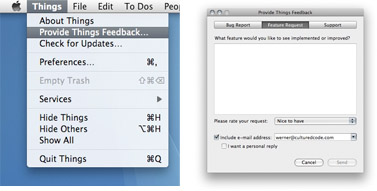
Using this dialog is a great way to send us your feedback. It helps us to more efficiently categorize your bug reports, feature requests, and support questions. If you want to include images or other attachments, just write a regular email to things@cu… (or click “Feedback” at the very bottom of this page).
However, to keep track of your thoughts or to share your suggestions with other users for discussion, the wiki and our upcoming forum are great places as well.
Pinging is currently not allowed.
The wiki alpha password that you just emailed to me does not work.
Things can be downloaded from our private wiki:
http://culturedcode.com/things/wiki/
Name: alpha_tester
Password: tidbamaz
I have the same experience that the password does not work.
Often times it is necessary to print your todo lists when it would otherwise be impractical to carry around a laptop. It would be nice if the printed results looked somewhat decent. Currently, it looks like a cutoff screenshot of the application. I hope this improves greatly. Otherwise, great app, congrats.
Sadly, the integrated feedback form doesn’t launch on my version. But I have a couple of problems/suggestions:
1. When I create a to do item with a due date of today, the checkbox disappears.
2. Is there a way to sort the active view of a task list/project?
3. One useful feature would be having a timer we could associate with a task. Taking it a step further, having a project that you could launch with a global timer, with project tasks having timed start and end points tethered to the global time would be really useful for things like following recipes, performing lab work, etc.
4. Is there a way to associate a given task with multiple projects, without having to recreate the task for each project it fits in?
5. Nesting projects would also be a really useful feature. Many of my projects are so large, that it is really helpful to separate them into subprojects.
Thanks for all the great work so far!
alex
A simple but useful feature would be to have the title on the top bar change with the folder that your in. Currently it just says Things regardless of what folder your in. Fr example, if I’m in the projects folder it would be nice to display it on the toolbar and have it highlighted as it is now.
I have to say this thing is phenomenal guys, great work!
Donovan
I found the following bug:
1 create a new task in the inbox
2 type a new tag
3 now click the add sign to create another task
4 the task is saved / the tag is saved as tag
5 the tag is not attached to the task just created
6 with existing tags this works correct
cheers remko
I didn’t realize this was mac only. Perhaps it’s obvious to others. I have a mac I can use for testing, but was looking for something cross platform windows & ubuntu.
regards,
Frank
Hi, I installed yesterday on my G4 MDD, 10.4.9, and it seems to have borked my computer. Mail started acting funny, and I could reboot only in safe mode. When I deleted all things Things, the computer started running fine again.
Until today, when it happened again.
I can’t find any more Things on my computer. If you have any tips about where to look, please advise. Of course, it may not be Things.
Thanks
Eric
@Eric: Things is a very well-behaved Mac OS X application in that it only stores files at locations recommended by Apple. This is all it does, really - we do not install any additional scripts or input managers or the like. So I can’t possibly see how Things could be responsible for the problems you encountered.
For reference, these are all files/folders that belong to Things:
- Obviously, the main application bundle (Things.app)
- Library/Application Support/CulturedCode/Things
- Library/Preferences/com.culturedcode.Things
- Library/Preferences/com.culturedcode.SoftwareUpdate
Once you delete those, there is absolutely no trace of Things left on the system.
Best,
Werner
Great app, being a small shop and wearing alot of hats this is quickly becoming a great goto app for quick todo’s. Can’t wait to see integration with other apps! More of a “would like to have” would be an iPhone variant next year to sync todo’s?!!?
The wiki alpha password that you just emailed to me does not work.
Things can be downloaded from our private wiki:
http://culturedcode.com/things/wiki/
Name: alpha_tester
Password: tidbamaz
I installed Things but I can’t get it up and running. Would be great if you could help me out. Looking forward to use it!
Any thoughts on how to backup and restore Things data?